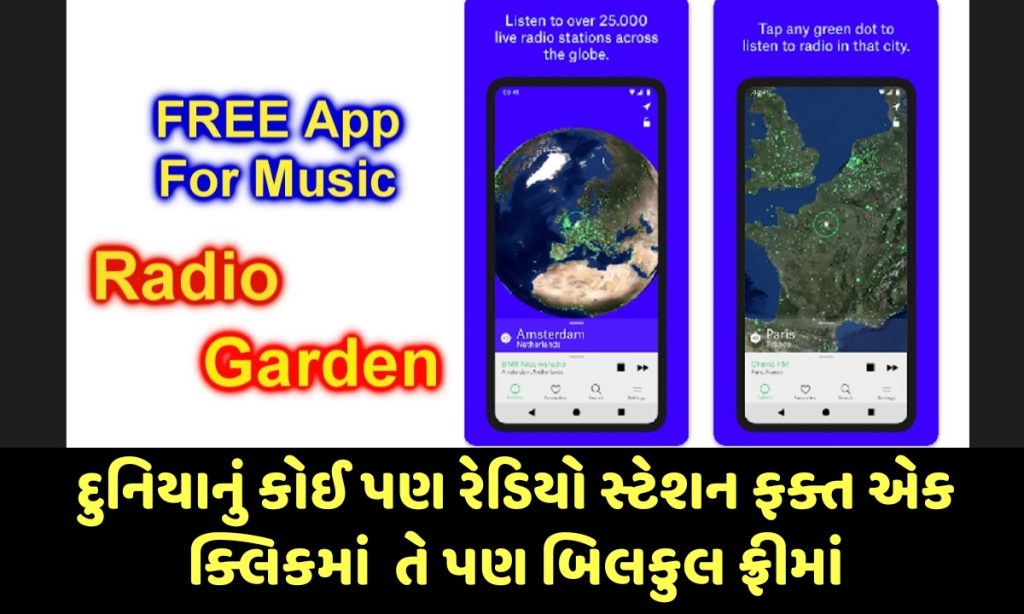
Radio Garden is a unique and engaging platform that lets you discover and listen to thousands of live radio stations worldwide through an interactive 3D globe interface. Instead of searching through lists or apps with limited options, you simply spin the globe, tap on green dots representing cities or towns, and instantly tune into local broadcasts. This innovative tool brings distant voices close, offering a fresh way to experience global cultures, music, news, and talk shows in real time.
What is Radio Garden?
Radio Garden is a free web and mobile platform that aggregates live radio streams from over 50,000 AM and FM stations across more than 230 countries. Launched initially as a web project in 2016 by a Dutch team associated with the Netherlands Institute for Sound and Vision, it evolved with native apps for iOS and Android in 2018. The core idea is simple yet powerful: visualize the Earth as a rotatable globe where every green dot marks a location with active radio stations.
It transforms traditional radio listening into an exploratory experience, allowing users to “travel” the world without leaving their seat. Whether you want to hear local news from a remote town or discover underground music scenes, Radio Garden makes global radio accessible and fun. The platform regularly adds new stations and updates broken links to ensure a smooth experience.
How Does Radio Garden Work?
Using Radio Garden is straightforward and intuitive:
- Open the Globe — Visit radio.garden on your browser or launch the app on your phone.
- Rotate and Explore — Drag your finger (or mouse) to spin the 3D globe. Zoom in or out to focus on specific regions.
- Tap Green Dots — Each green dot represents a city or town with one or more radio stations. Tap a dot to see available stations and start streaming instantly.
- Enjoy Live Audio — Listen to real-time broadcasts, including music, news, talk shows, sports, and more. The stream continues playing even if your phone screen sleeps or you switch apps.
Click here – Explore the Live Garden Radio by rotating screen
You can also use the search function to find stations by city, country, or genre. Playlists and curated sections like “Rare Tongues,” “Radio Diaspora,” or “Island Life” help discover unique content. Stations play their own ads, as Radio Garden primarily indexes live streams rather than hosting content itself.
Key Features of Radio Garden
- Interactive Globe Interface: The standout feature that makes exploration visual and engaging.
- Thousands of Stations: Access to tens of thousands of live AM/FM and internet radio stations worldwide.
- Favorites and Bookmarks: Save preferred stations for quick access later.
- Background Playback: Audio continues uninterrupted even when the device is locked or in sleep mode.
- Cross-Device Support: Works seamlessly on mobiles, tablets, smartwatches, car radios, Amazon Echo, Google Home, and Alexa devices.
- Genre and Category Browsing: Stations are often categorized by content type (news, classical, comedy, rock, sports, etc.) or themes.
- Regular Updates: New stations added daily; inactive ones are removed or fixed for reliability.
- Search and Curated Playlists: Find specific locations or explore themed collections.
The platform emphasizes cultural connection, helping users reconnect with home countries or explore foreign languages and communities through radio.
Benefits of Using Radio Garden
Radio Garden stands out for its free access to diverse global content without subscriptions for basic use (premium options may remove ads or add extras in some versions). It offers an authentic live radio experience that algorithms-driven streaming services often lack—complete with local flavor, DJ personalities, and real-time programming.

For travelers, expats, or language learners, it’s invaluable for tuning into Hindi radio, regional Indian stations, or international broadcasts. Music enthusiasts discover new genres and local hits, while news listeners gain perspectives from different parts of the world. The app is particularly praised for its simplicity and the joy of “stumbling upon” unexpected stations while spinning the globe.
It also revives the nostalgia of shortwave radio but with modern internet reliability, making distant cultures feel closer.
Availability and How to Get Started
- Web Version: Simply go to radio.garden in any modern browser—no installation needed.
- Android App: Available on the Google Play Store (search for “Radio Garden”).
- iOS App: Download “Radio Garden Live” from the App Store.
The apps provide a smoother experience with better background playback and notifications. Both free versions deliver the core globe experience. For Indian users, it includes many Hindi and regional language stations, making it one of the convenient options for online FM radio.
Tip: Start by exploring popular cities like New York, London, or Mumbai, then venture into lesser-known areas for surprising discoveries.
Limitations and Things to Know
While excellent, Radio Garden has some constraints. Availability of stations depends on whether they offer public internet streams—some traditional AM/FM stations may not appear if they lack online broadcasting. Audio quality varies by the source station’s stream. The free version includes visual ads on the platform, and stations themselves may play commercials.
It focuses primarily on live radio rather than on-demand podcasts or extensive archives (though some stations offer their own). Advanced features like high-res audio or integrated lyrics are limited compared to dedicated music streamers. Internet connection is required for streaming, so it’s best used with Wi-Fi or generous data plans for longer sessions.
Conclusion
Radio Garden is more than just a radio app—it’s a window to the world’s voices and cultures. Its globe-spinning interface turns passive listening into an active adventure, perfect for curious minds who want to break out of algorithmic echo chambers. Whether you’re in Ahmedabad looking for international news, classical music, or regional vibes, this platform delivers endless discovery at no cost.

Download or bookmark it today and start exploring. With thousands of stations and regular updates, there’s always something new to hear.
Important Links
| Home page | Click here |
| Join WhatsApp group | Click here |
| Download now | Click here |
| Live Radio | Click here |
Frequently Asked Questions (FAQ)
1. Is Radio Garden completely free?
Yes, the core features—including the globe interface and access to thousands of live stations—are free on both web and apps. Some in-app purchases or premium tiers may exist for ad removal or extra functionality.
2. How many radio stations does Radio Garden have?
It provides access to thousands (often cited as over 40,000–50,000+) stations from more than 230 countries, with new ones added regularly.
3. Can I listen to Hindi or Indian radio stations on Radio Garden?
Absolutely. It includes many Indian and Hindi-language stations, categorized for easy discovery. Users in India find it useful for local FM and online radio.
4. Does the audio keep playing when I lock my phone?
Yes, the app supports background playback, so the radio continues even if your screen sleeps.
5. Is Radio Garden available on iOS and Android?
Yes. There’s an official Android app on Google Play and “Radio Garden Live” on the Apple App Store, plus a fully functional web version.
6. Can I save favorite stations?
Yes, you can bookmark or save favorites for quick access in future sessions.

7. Do I need to create an account?
Basic listening works without signing up. Creating an account may unlock better bookmark syncing or additional features.
8. What kind of content is available?
Everything from music (rock, classical, jazz, etc.) to news, talk shows, comedy, sports, and local community broadcasts. Many stations include live DJs and regional flavors.
9. Is Radio Garden safe and legal?
It is a legitimate platform that indexes public radio streams. Ensure your internet use complies with local laws, and note that stations may carry their own advertisements.
10. How do I submit a new radio station?
The official site has a submission form for station owners or listeners to suggest additions.